UP Excise Scanner App: What Your Shop Must Scan in 2026
Published By: Jatin Monga (CEO) on 14 Nov 2026
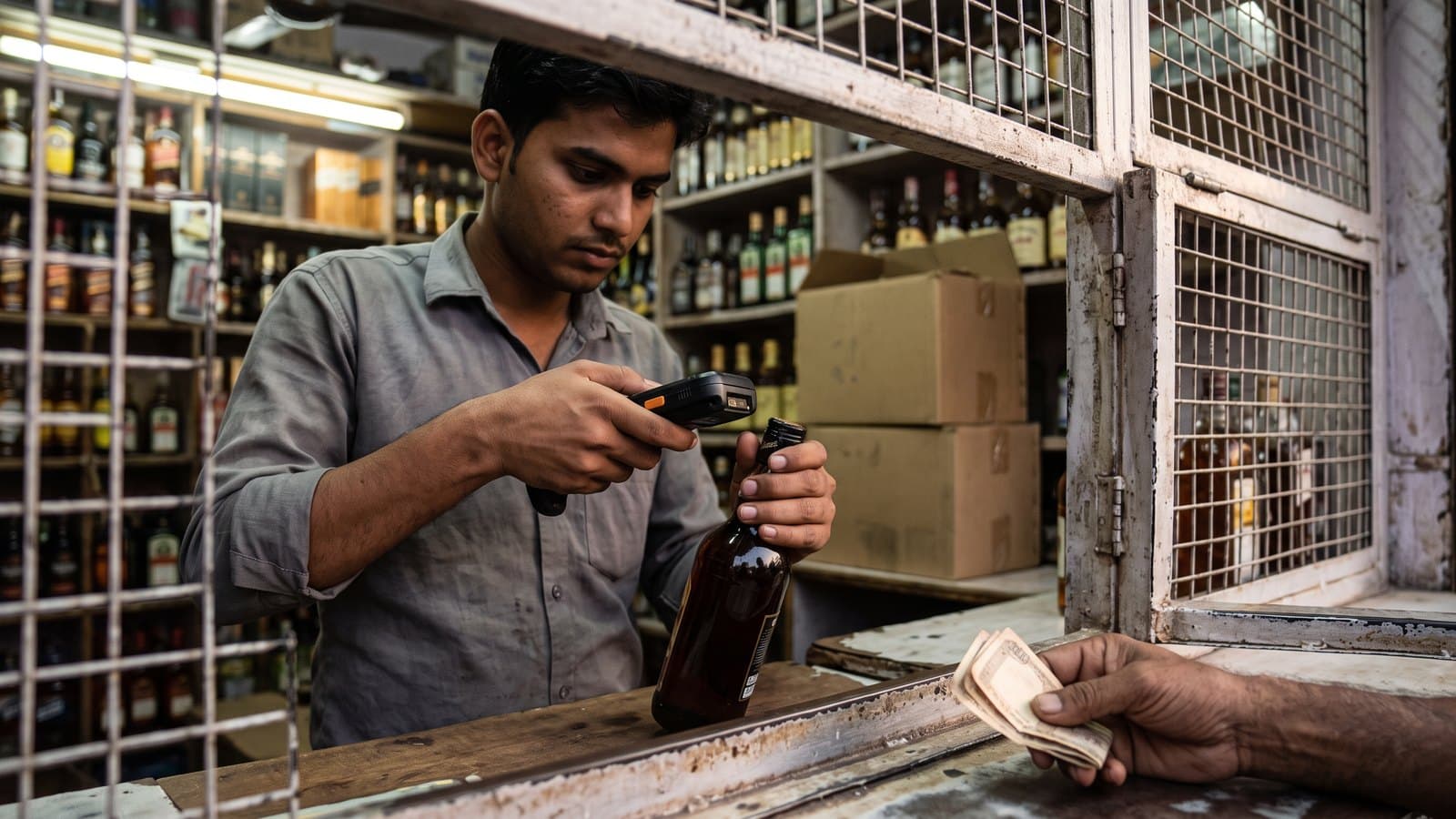
Every licensed liquor shop in Uttar Pradesh has an excise scanning device. The salesman scans the QR code on the cap of every bottle he sells, and the shop scans the QR code on the invoice when stock comes in. Most owners call it the UP excise scanner app, or simply "the machine".
The machine itself is easy to use. The trouble is the bottles that go out without a scan. At month end, the excise system compares what your shop bought with what it scanned out. A gap that keeps showing up month after month is a risk to your licence.
This guide explains what the device is for, what you scan and when, why scans get missed, and a ten-minute check your manager can do every night.
What the UP excise scanner app is for
UP runs its whole excise chain on one online system, from the distillery and the wholesaler to your counter. Each bottle carries an excise QR code on the cap. That code belongs to that one bottle.
When your salesman scans it at sale, the system learns three things. It knows which bottle was sold, which shop sold it, and when. Newspaper reports from 2022, when the machines went out to shops, gave the department's reasons:
Stock allotted to one shop cannot be sold from another shop.
The department sees each shop's sale every day.
The customer can check the MRP, so selling above the printed rate gets harder.
In 2022, district excise officers in Gorakhpur and Ghaziabad told the press that the machines were given to licensees free of cost. They said the rule covered model shops, English liquor, country liquor and beer shops. The Gorakhpur officer also said that tampering with the machine brings a fine the first time and cancellation of the licence the second time. Rules can change from year to year, so confirm the current terms with your district excise office.
The excise QR on the cap is not the product barcode on the label. Our guide on wine shop barcode scanners explains the difference.
Where to get the device or app
Many owners search for a UP excise scanner app download. Be careful here. The shop's scanning device or app is issued through the excise system. It is not something you pick up from a random website or an APK file shared on WhatsApp.
The two UP excise apps listed publicly on Google Play are for other people. The UP Excise Citizen App is for customers. The UP Excise Flying Squad App is for excise officers. Neither one replaces your shop's device. If your device is lost, broken or not logging in, call your district excise office. They will tell you how to get it repaired or replaced.
What gets scanned, and when
A UP shop scans at two points. Both matter for your numbers.
Purchase inward
When stock reaches your shop, scan the QR code on the invoice. That one scan brings the whole invoice into your excise stock. Do it on the day the stock arrives. If the invoice is scanned late, your stock on the excise system looks short for that day.
Every sale
Every bottle that leaves the counter gets its cap QR scanned on the excise device. This means every bottle, every time, including:
A full peti sold to a wedding party. Each bottle in it is scanned, not just one.
Quarters and nips at rush hour.
A bottle a regular customer "booked" earlier and picks up later.
Beer sold cold from the fridge.
Who else scans your bottles
Customers and inspectors can scan your bottles too. The UP Excise Citizen App lets a customer scan the QR code of a bottle bought at a retail shop. The state's excise portal also has a public search for a barcode, QR code or licence number. The Flying Squad App lets excise officers scan a bottle's QR code, a transport pass number or an indent number.
So a customer can check a bottle's MRP on his phone, right at your counter. The 2019 text of UP's foreign liquor retail rules lists a minimum compounding fee of Rs. 10,000 for a first sale above MRP. Confirm the current amount with your district excise office.
The scan share the district office watches
At the start of each month, your shop enters the previous month's closing stock in the monthly MST filing. The system then shows how much of the stock you bought was scanned out at sale. This is your scan share.
Here is a made-up example. Your shop bought 3,000 bottles in a month and had little old stock. The device shows 2,550 bottles scanned out. Your shelf count says about 300 are left. So roughly 150 bottles went out without a scan. Your scan share is lower than it should be.
The district office watches this share. A low share, month after month, can put the licence at risk. We have not found the expected share in any published policy or notice. Ask your district excise office what share it expects this year, and treat that as your floor.
We cover the rest of the monthly filing in our guide to the UP excise portal login.
Why scans get missed
Shops rarely skip scans on purpose. Scans get missed for ordinary reasons:
Rush hour. Between 7 and 10 pm, ten customers push at the mesh. The salesman bills, takes cash and hands over bottles. The scan is the step he drops.
A new salesman. He knows the billing but not the device. Or he scans one bottle from a peti and thinks that is enough.
A dead battery. The device dies at 8 pm, and nobody charges it until morning. Every sale in between goes unscanned.
No network. The device cannot reach the server. The salesman thinks the scan went through when it did not.
A damaged cap. The QR is scratched, wet from the fridge or torn. The device will not read it. The salesman gives up and sells the bottle anyway.
Late purchase entry. The invoice is scanned a day late, so the excise stock looks short.
Each of these is fixable. The fix is to find the gap the same night, while the salesman still remembers what happened.
The nightly check: bottles billed against bottles scanned
This check takes about ten minutes at closing. Do it every night, not at month end.
Take the day's billed bottles. Use your sales report for the day. Count bottles, not rupees.
Take the day's scanned bottles. Read the count of bottles scanned out on the excise device.
Compare the two. The numbers should match. Here is a made-up example: billed 412, scanned 396. The gap is 16 bottles.
Chase the gap tonight. Ask the counter staff which hour was busiest. Check whether the device died or lost network. Look for bottles with damaged caps.
Write it down. Note the gap and the reason in a small notebook or in your daily WhatsApp group. After a week, you will see a pattern: one salesman, one hour or one cause.
Fix the cause, not just the day. Keep the device charging on a fixed point at the counter. Put a power bank in the drawer. Train every new salesman on the device on his first day.
A damaged cap needs care. Do not sell a bottle you cannot scan. Keep it aside and ask your district excise office what to do with it.
Also check purchase days. If stock came in today, confirm that the invoice was scanned today.
How BottleShop helps with the nightly check
BottleShop does not replace the excise device. Your salesman still scans every cap on it.
What BottleShop does is take the pressure off the counter, so the scan does not get dropped. Billing takes under one second, so at rush hour the salesman has time to scan. It also gives the manager the first half of the nightly check without any counting by hand. You can see each piece in the BottleShop features.
Rush-hour billing. Sub-1-second billing on an Android tablet keeps the line moving between 7 and 10 pm. Billing keeps working offline when the internet drops and syncs later.
The daily sales report. At closing, the manager opens the day's sales report and reads the bottles billed. He matches that against the device's scanned count. The gap shows in minutes.
Daily registers and MST figures. The daily category registers for IMFL, wine, beer 5% and beer 8%, and the monthly MST figures, are built from the bills. You can read more on our UP MST software page.
Purchase entry on the day. Stock is entered when it arrives, so your stock and the excise stock move together.
All of this comes in the Essential plan. It covers 1-second billing with state compliance, purchase entry, and daily, business and compliance reports. It also sends a daily WhatsApp report to the owner.
Frequently Asked Questions
What is the UP excise scanner app?
It is the scanning device or app that UP issues to every licensed liquor shop through the excise system. The shop scans the QR code on the purchase invoice when stock arrives and the cap QR of every bottle it sells. The scans tell the department what each shop bought and sold, bottle by bottle.
Where can I download the excise scanner app?
The shop's scanning app or device comes through the excise system, not from a public download. The UP Excise Citizen App on Google Play is for customers, and the Flying Squad App is for officers. If your device is lost, broken or not working, contact your district excise office for a repair or replacement.
Do I need to scan every bottle, even in a full peti?
Yes. Every bottle sold must have its cap QR scanned on the excise device. When you sell a full peti, every bottle in it is scanned. Scanning one bottle and selling the rest unscanned lowers your scan share. Confirm any special rule for bulk or event sales with your district excise office.
What scan share does the district office expect?
The district office compares bottles bought with bottles scanned out at sale. A low share, month after month, can put the licence at risk. We have not found the expected share in any published policy or notice. Ask your district excise office what share it expects this year.
What should I do with a bottle whose cap QR will not scan?
Do not sell it unscanned. Keep the bottle aside, note its brand and size, and ask your district excise office what to do. A damaged cap can come from the supply chain, so check caps when stock arrives. Report damaged bottles early rather than at month end.
Can a customer check a bottle's QR code?
Yes. The UP Excise Citizen App lets a customer scan the QR code of a bottle bought at a retail shop. The state excise portal also has a public QR code and licence search. A customer can check the MRP at your counter, so always sell at the printed rate.
Teen ghante ka parcha ab khud ban jaata hai. Message us on WhatsApp at +91 84473 30196 for a free inventory audit of your shop.
Last updated: 14 November 2026